Cute Bear Holding Ice Cream Coloring Page for Creators
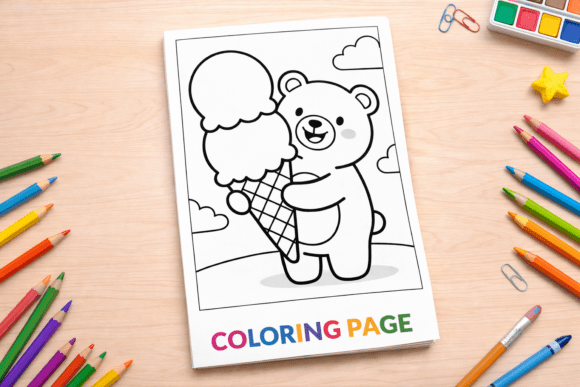
Some coloring pages feel like they were made for everyone but work perfectly for no one. The Cute Bear Holding Ice Cream Coloring page breaks that pattern. It features a teddy bear holding a large double scoop ice cream cone, drawn with clean, bold outlines in black and white line art. The design is straightforward enough for a toddler yet polished enough for a professional project. Whether you are an educator looking for classroom materials, a publisher creating KDP interiors, or a parent searching for a quiet afternoon activity, this single page offers more versatility than most realize.
What Makes This Coloring Page Different
The difference lies in the balance between simplicity and visual appeal. The bear is cute without being overly detailed. The ice cream cone is large and central, making it the natural focal point. The bold outlines help younger children stay inside the lines while giving older users a clean base for shading or digital coloring. The file comes in five formats: PNG, JPG, print-ready PDF, EPS vector, and high resolution 300 DPI at 8.5x11 inches. That means you can print it, edit it, or import it into another project without quality loss.
Because the design is intentionally uncluttered, it works across different contexts. A preschool teacher sees a manageable coloring task. A graphic designer sees a vector element they can recolor or resize. A small business owner sees a printable that costs pennies to produce but sells for a fair price. The same lines serve different purposes depending on who is looking at them.
Why This Page Matters for Educators and Parents
For teachers and homeschooling parents, the Cute Bear Holding Ice Cream Coloring page fits naturally into summer lesson plans or dessert-themed units. The large coloring areas make it suitable for children who are still developing fine motor skills. You can use it to practice hand-eye coordination, introduce color recognition, or simply give young learners a relaxing break between structured activities.
A kindergarten teacher might print the PDF for a Friday afternoon wind-down activity. A homeschool parent could pair it with a story about bears or a simple math lesson counting scoops of ice cream. Because the design is not tied to any holiday, it stays useful year-round. You can also ask children to color the ice cream with their favorite flavors and then describe why they chose those colors, turning a simple activity into a conversation starter.
How Creators and Publishers Can Use This Resource
If you create content for children, this coloring page offers commercial flexibility. The bundle includes an EPS vector file, which means you can scale the design, change the line thickness, or remove the background entirely. A KDP publisher could include this page in a summer activity book, a dessert-themed coloring collection, or a bundle of animal coloring pages. Since commercial use is allowed, you are free to sell the printed pages or include them in digital products.
For example, if you are building a coloring book on Etsy, you might combine this page with other food-themed designs. Or if you are a freelance illustrator, you could use the EPS file as a base to create derivative works, adding background elements or modifying the bear's expression. The 300 DPI resolution ensures that print reproduction stays crisp, whether you are printing at home or sending the file to a professional printer.
- PNG and JPG files work best for digital previews, social media mockups, or one-off prints.
- Print-ready PDF saves formatting time for classroom or batch printing.
- EPS vector file gives you complete control if you use design software like Adobe Illustrator or Affinity.
What Beginners Should Look For
If you are new to using coloring pages for your classroom, your small business, or your personal projects, focus on three things: format flexibility, print readiness, and design simplicity. This page checks all three. You do not need special software to use the JPG or PDF. You can open the PNG in nearly any application. The 8.5x11 inch size matches standard printer paper, so there is no awkward trimming or scaling.
Start by printing a single page on ordinary paper and testing it with whatever coloring tools you have on hand. Crayons, markers, colored pencils, and even watercolor pencils all work on this design because the lines are bold enough to resist smudging. If you are testing for commercial use, print one copy and evaluate the clarity of the lines after coloring. The real test is whether the finished page looks clean and appealing to your target audience.
What Experienced Users Evaluate Differently
Professionals and experienced creators tend to look beyond the surface. You probably care less about whether the bear is cute and more about how the file behaves under modification. The EPS vector file is the key here. You can open it in vector editing software, change the stroke weight, convert the lines to a different color, or even separate the bear and the ice cream into distinct layers.
For example, if you are designing a coloring app, you could import the vector file and use the separate elements to create a digital coloring experience where children can color the bear and the ice cream independently. Or if you are a print-on-demand seller, you might resize the image to fit a smaller format like 6x9 inches without losing sharpness. The 300 DPI resolution and vector format give you room to experiment without degrading the original artwork.
Experienced users also evaluate long-term usefulness. A generic bear with an ice cream cone never goes out of style. It is not tied to a movie release, a seasonal trend, or a specific character. That means you can repurpose it across multiple products over several years without worrying about dated references.
Balancing Quality and Cost for Business Owners
If you run a small business around printables or educational materials, every resource you purchase affects your margin. This bundle delivers five formats in one package, which reduces the need to buy separate files for different use cases. You get a print-ready PDF, a high-res PNG and JPG for digital use, and an EPS vector for editing. That coverage alone can replace three or four separate purchases from different sellers.
The commercial use allowance is especially valuable if you sell on platforms like Etsy, Amazon KDP, or Teachers Pay Teachers. You can include this page in a paid product without paying ongoing royalties or asking for special permission. Just make sure to read the specific terms of the license that came with your purchase, as some commercial licenses require you to modify the design before resale.
For a realistic example, imagine you are creating a "Summer Fun" activity book for KDP. You have ten activities to design. Using this page as one of the interiors saves you the time of drawing a bear from scratch. Your cost is a one-time purchase. The time you save on illustration can go toward writing instructions, designing the cover, or formatting the book for print.
When This Coloring Page Fits Your Project
Ask yourself a few questions before deciding if this resource matches your goals.
- Who is your audience? If you are working with toddlers or preschoolers, the simple lines and large coloring areas are ideal. If you are designing for older children, the same page can serve as a quick warm-up activity.
- What format do you need? If you only need a one-time print, the PDF or JPG is enough. If you plan to edit, resize, or repurpose the art, the EPS vector file provides the most control.
- What is your skill level? Beginners can use the page straight out of the box. Experienced designers can treat the vector file as a starting point for derivative works.
- What is your budget? One bundle that covers multiple formats and commercial use offers better value than buying separate files for each purpose.
If your project involves summer themes, dessert themes, bear or animal themes, or general fun coloring activities for young children, this page fits naturally. If you are working on a highly specific theme like space exploration or historical figures, this design would feel out of place unless you repurpose it as a bonus activity.
Practical Tips for Getting the Most Out of This Page
Print the PDF on heavy paper if you plan to use markers or paint. The 300 DPI resolution means the lines stay crisp even on textured paper. For classroom use, print several copies in advance and store them in a folder labeled by theme. That way you can pull out a bear and ice cream page on short notice when a lesson runs shorter than expected.
If you are using the EPS file, remember to convert text to outlines if any exists, though in this case the design is purely graphical. Experiment with changing the line color from black to a dark brown or gray for a softer look. You can also duplicate the bear and make a pattern or coloring sheet series by adding different dessert items like cupcakes or popsicles.
For digital creators, the PNG file with transparent background is ready to drop into a design tool like Canva, Procreate, or Photoshop. You can layer it over a colored background, add a name or title, and create a custom coloring sheet in minutes. This workflow works well for personalized printables sold on Etsy or offered as freebies to build an email list.
Evaluating Long-Term Usefulness
A common mistake is buying a resource that you use once and never touch again. This coloring page avoids that trap because of its thematic neutrality. Bears and ice cream are classic subjects that children gravitate toward year after year. You can use the same page in a summer activity book this year and in a food-themed worksheet next year without it feeling stale.
The vector format also future-proofs your investment. If you upgrade your design software or switch to a different platform, the EPS file remains usable. Unlike JPEGs that lose quality after repeated saves, vector files stay resolution-independent. That makes this bundle a long-term asset rather than a one-time consumable.
If you are building a library of coloring resources for repeated use, prioritize pages with similar characteristics: clean lines, versatile themes, multiple formats, and commercial permission. This page checks all of those boxes while remaining affordable enough for individual creators and small businesses alike.
The real value of the Cute Bear Holding Ice Cream Coloring page is not in any single feature but in how much distance you get from a single download. Whether you are a teacher preparing next week's lesson, a parent looking for screen-free entertainment, or a creator building a product catalog, this page delivers practical use without unnecessary complexity.